EDDM data for Claude, ChatGPT, Gemini and AI agents
EDDM2GO MCP server
Connect your AI assistant to EDDM2GO and plan an Every Door Direct Mail campaign in the chat you already use. It looks up ZIP code demographics and USPS carrier routes, prices a mailing and saves a quote link you order from on eddm2go.com.
Each tool answers from EDDM2GO's own data and rules, and most answers include links to the eddm2go.com pages that go deeper. Your assistant decides which ones to call from your question.
Plan and advise
plan_mailing
Give it a type of business and a ZIP code. It picks the carrier routes that fit, using the same targeting rules as our route map, prices the mailing and returns a map link with the routes selected.
eddm_advice
EDDM2GO's own answers on USPS rules, Full Service vs Print Only, sizes, artwork, ordering and which audience suits each business.
find_pages
Finds the eddm2go.com guide, tool, industry or city page that answers a question, so your assistant can link it.
Find places and ZIP codes
search_places
Search a city or the start of a ZIP code and get the matching ZIP codes.
zip_profile
Census demographics for one ZIP code (income, age, homeowners, households, home values) plus its carrier-route totals.
Carrier routes
list_routes
Every USPS carrier route in a ZIP code with residential and business counts and an estimated household profile.
find_routes
Search up to 10 ZIP codes for routes that match income, homeowner, families-with-kids or size filters. Returns the best 25.
Products and prices
list_products
Every EDDM postcard, flyer and sell sheet size, the papers, and the two services: Full Service and Print Only.
get_quote
The current price for a format, size, paper and quantity, from the same pricing the checkout uses. Sales tax is added at checkout.
Quote links
create_quote_link
Saves a quote for the routes you chose, in your name, and returns a private link. You review it and order on eddm2go.com.
How it works
Three steps from account to answer
1
Create a free EDDM2GO account
An email and a password. You land on Account → AI assistants, which shows the URL, setup steps for each app and your usage.
2
Add the URL to your assistant
Paste the server URL into Claude, ChatGPT, Gemini or another MCP client, then sign in to EDDM2GO and click Allow.
3
Ask about a mailing
Name the ZIP codes or the area, who you want to reach and the mailer you have in mind. Ask the assistant to save a quote link when the plan looks right.
Allow pop-ups for your assistant's website. Claude, ChatGPT and Gemini open the EDDM2GO window as a pop-up.
3
Copy the URL.
https://www.eddm2go.com/mcp
Then follow the steps for your assistant
Claude
1
In claude.ai or Claude Desktop, open Settings, then Connectors, and click Add custom connector.
2
Name it EDDM2GO, paste the URL and click Add.
3
Click Connect next to EDDM2GO.The EDDM2GO window opens. If it asks you to sign in, sign in to EDDM2GO.
4
Click Allow.You are back in Claude and EDDM2GO shows as connected.
5
In a chat, turn EDDM2GO on from the tools menu and ask your question.
ChatGPT
1
Open Settings, then Apps & Connectors, then Advanced, and turn on Developer mode.If you don't see Developer mode, your ChatGPT plan doesn't offer custom connectors.
2
Back in Apps & Connectors, click Create. Name it EDDM2GO, paste the URL, choose OAuth and create the connector.The EDDM2GO window opens. If it asks you to sign in, sign in to EDDM2GO.
3
Click Allow.You are back in ChatGPT.
4
In a chat, add EDDM2GO from the tools menu and ask your question.ChatGPT asks before it saves a quote link.
Gemini
1
In Gemini, open Settings, then Connected Apps, and choose Add a custom app.If you don't see Add a custom app, your Google account can't use custom apps yet. They need a personal Google account, not a Workspace account.
2
Name it EDDM2GO, paste the URL and add it.
3
Google shows "Link your Google Account and [Custom] Eddm2go account". Scroll down and click Continue.This is Google's standard notice for every custom app.
4
Click Allow in the EDDM2GO window.You are back in Gemini. If Gemini says "Account linking is required", see the fixes below.
5
In a chat, ask Gemini to use EDDM2GO, for example "Use EDDM2GO to plan a mailing in [ZIP code]".
Start gemini and type /mcp auth eddm2go.The EDDM2GO window opens in your browser.
3
Click Allow, then go back to the terminal.
Claude Code
claude mcp add --transport http eddm2go https://www.eddm2go.com/mcp
1
Run the command above in a terminal.
2
In Claude Code, type /mcp, pick eddm2go and choose Authenticate.The EDDM2GO window opens in your browser.
3
Click Allow, then go back to Claude Code.
Other apps
The app must support remote MCP servers over Streamable HTTP with OAuth sign-in (dynamic client registration and PKCE).
1
Add the URL as a remote MCP server.The app finds the EDDM2GO sign-in by itself and opens the EDDM2GO window.
2
Click Allow.
3
If the app can't sign in, create a personal token in Account → AI assistants and send it as an Authorization: Bearer header.
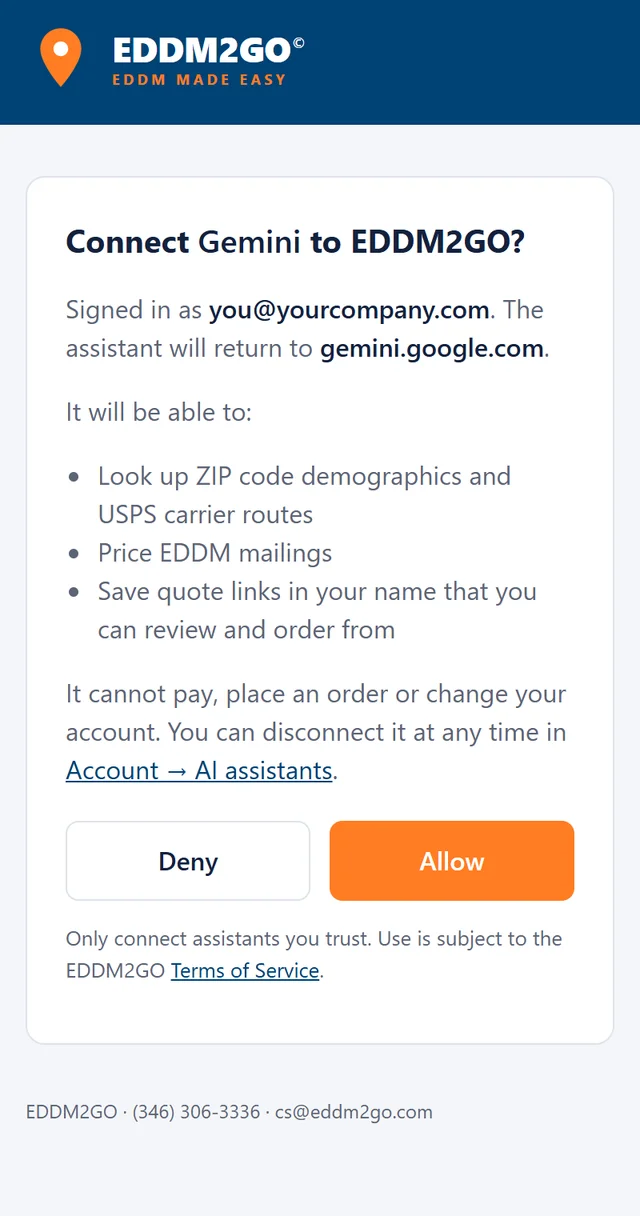
The EDDM2GO window. It shows your assistant's name and your EDDM2GO email. Click Allow.
You're connected when your assistant shows EDDM2GO as connected. You can also check Account → AI assistants: it lists each connected app and today's usage.
Fixes for common problems
Gemini says "Account linking is required"
The EDDM2GO window was blocked or closed before you clicked Allow. Allow pop-ups for gemini.google.com, sign in to eddm2go.com in the same browser, then click Connect on EDDM2GO in Connected Apps and go through the steps again.
No EDDM2GO window opens
Your browser blocked the pop-up. Click the pop-up icon at the right end of the address bar, choose Always allow for your assistant's site, and connect again.
The EDDM2GO window asks me to sign in
Sign in, or create a free account. The window then shows Allow.
I can't find the custom connector option
Your plan or account type doesn't offer custom connectors: ChatGPT needs a plan with developer mode, and Gemini needs a personal Google account. Claude Code, Gemini CLI and other MCP apps work on any plan.
Still stuck? Call (346) 306-3336 or email cs@eddm2go.com.
Try a real request
Give your first conversation a starting point
Your assistant also lists five ready-made EDDM2GO prompts, such as "Plan an EDDM mailing for my business" and "Compare ZIP codes for my business" (in Claude, look under the + menu). Or copy one of these and replace anything in brackets. The answers depend on the ZIP codes you choose and on current prices.
Plan a mailing
Plan a mailing for my business
I run a [type of business] near [ZIP code or city]. Use EDDM2GO to plan an EDDM mailing to about [number] homes: pick the routes that fit my business, explain why, price Full Service and Print Only, and link the EDDM2GO pages I should read.
Price a mailing
Price a postcard to those homes
Use EDDM2GO to price a 6.5 x 9 postcard on 16 pt card to [number] homes. Show Full Service and Print Only side by side and tell me what each one includes.
Compare areas
Compare two ZIP codes
Use EDDM2GO to compare [ZIP code] and [ZIP code]: households, median income, homeowners and families with kids, then the number of carrier routes and homes in each. Which suits a [type of business]?
Save a quote
Turn the plan into a quote link
Use EDDM2GO to save a quote link for the routes we picked, as a 6.5 x 9 postcard. Give me the link and the total so I can review it on eddm2go.com.
What it will not do
You stay in charge of every order
No payments
An assistant cannot charge a card or place an order. You order from the quote link on eddm2go.com.
No access to your orders
The tools read public data and prices. They cannot see your past orders, your files or your payment details.
A person checks every order
Orders placed from a quote link are reviewed by a person before they print, like every other order.
Questions
MCP server FAQ
What is an MCP server?
MCP (Model Context Protocol) is a standard way for an AI assistant to call outside tools. The EDDM2GO MCP server gives a connected assistant ten tools for planning a mailing, ZIP code data, USPS carrier routes, EDDM prices, EDDM2GO's own advice and quote links, plus five ready-made prompts, so its answers come from our data and rules instead of a guess.
Does EDDM2GO run its own AI behind the tools?
No. Your assistant does the thinking. The tools give it EDDM2GO's data, prices and targeting rules, the same ones the route map and website chat use, and links to the pages that explain them.
Gemini says "Account linking is required". What do I do?
The EDDM2GO sign-in window was blocked or closed before you clicked Allow. Sign in to eddm2go.com in the same browser, allow pop-ups for gemini.google.com, then click Connect on EDDM2GO in Gemini's Connected Apps. On Google's "Link your Google Account" page, click Continue, then click Allow on the EDDM2GO window.
Which assistants can I connect?
Claude (web, desktop and Claude Code), ChatGPT with developer mode, Gemini (the Gemini app and Gemini CLI), and any MCP client that supports remote servers over Streamable HTTP with OAuth sign-in.
Does it cost anything?
No. The connection needs a free EDDM2GO account. You pay only if you order a mailing, and you order on eddm2go.com like any other customer.
Can the assistant place an order or charge my card?
No. The tools only read data, price mailings and save quote links. A quote becomes an order only when you open the link, review it and check out yourself. The assistant never sees your orders or your payment details.
Where does the data come from?
Demographics are U.S. Census Bureau American Community Survey 5-year estimates, which carry margins of error. Carrier routes and their residential and business counts come from USPS. Route-level household profiles are our estimates built from Census data. Prices come from the same pricing the checkout uses.
Are there limits?
Yes, per account: 300 tool calls a day, 60 different ZIP codes a day and 30 calls a minute. That covers planning several mailings. If you need more, call or email us.
How long is a quote link good for?
14 days. The link shows the routes, the mailer and the price at the time it was saved. After it expires, open the routes again to see the current price.
How do I disconnect?
Open Account → AI assistants on eddm2go.com and click Disconnect next to the app, or Revoke next to a personal token. Removing the connector in the assistant's own settings works too.
My tool cannot sign in. Can I use a key?
Yes. Create a personal token in Account → AI assistants and send it as an Authorization: Bearer header. It is shown once, works for one year and has the same daily limits. Revoke it there at any time.
Connect your assistant to EDDM2GO
Create a free account, add one URL, and plan your next EDDM mailing in the chat you already use.